Explainer
How do I read my futures replay stats?
The Your backtesting section of the Lab page turns your closed paper trades into a trade count, win rate, net, average R, profit factor and drawdown.
Updated
The short answer
Close some paper trades in a replay, and the Lab page gains a Your backtesting section. It reads the same closed trades as the Trade tab, after commission, and shows them as tiles, an equity curve and breakdowns. The pictures below come from a throwaway sample run, so the figures are not a result of anything.
Read the page from the top
Pick a run
Each run with at least one closed trade has a chip at the top. Choose one to read it; the figures and the charts update without a new page.
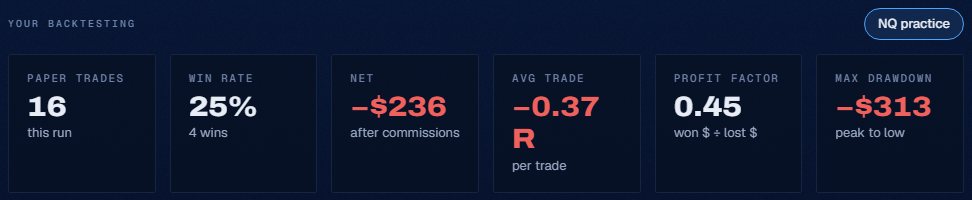
Read the six tiles
Paper trades is the count. Win rate is the share that closed above zero. Net is the total after commissions. Average trade is in R, the profit or loss as a multiple of the stop distance. Profit factor is dollars won divided by dollars lost. Max drawdown is the largest peak-to-low fall in dollars.
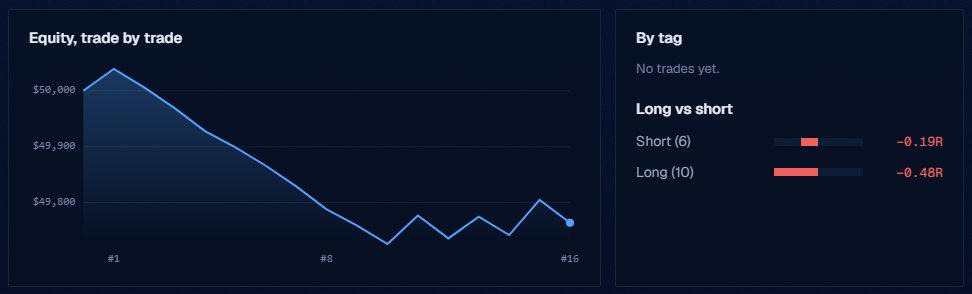
Check the equity curve
The curve plots the account trade by trade from the starting balance. Next to it, Long vs short splits the average R by side, and By tag splits it by the tags on your journal entries.
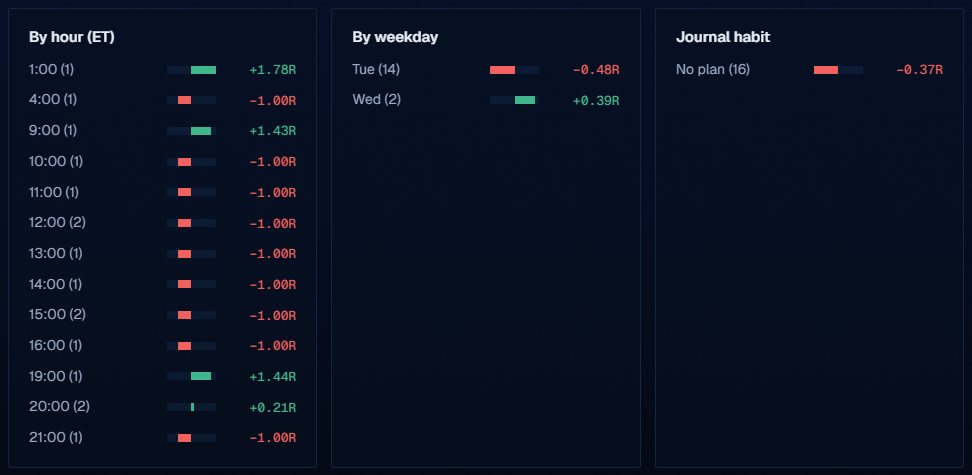
Look for patterns
By hour and By weekday group the trades by the Eastern time and day they opened. Journal habit compares trades that had a long or short journal entry before the fill with trades that did not.
What the figures mean
R needs a stop. A trade with no stop still counts in the dollar figures but has no R. A handful of trades says little, and the page prints what it has without saying more.
Journal habit uses your own entries: a trade counts as planned when a journal entry with the decision long or short was written at or before its fill. It shows whether writing first changes your results, nothing more, and with few trades it will move a lot from one trade to the next.
The figures describe your paper trades only. They are simulated, they do not predict anything, and they use 1-minute fills.
These are counts and ratios of your own paper trades. The page does not judge them.
What the Trade Lab does not do
The Trade Lab replays history. It has no live data, and no real order is ever placed. Paper fills are modelled on 1-minute bars, so they approximate real fills.
Each account can read 40 distinct 1-minute sessions and start 5 new runs per UTC day, and it needs a verified email. The Lab itself is free.
Questions and answers
Where are my replay stats?
On the Lab page, under Your backtesting. It appears once a run has a closed paper trade.
What is profit factor?
Dollars won divided by dollars lost across the closed trades in the run you picked.
What is R in the stats?
A trade result divided by the distance from the entry to the stop that was working when it opened. Trades with no stop have no R.
How is max drawdown measured?
In dollars, from the highest point of the equity curve to the lowest point after it.
Why do some trades have no R?
R is measured against the stop that was working when the position opened. A trade opened without a stop still counts in the dollar figures, but it has no R.
How many trades do I need before the stats mean anything?
More than a few. See the explainer on how many trades a backtest needs.